Summer Coding Camps for Kids: Complete Parent Guide (2026)
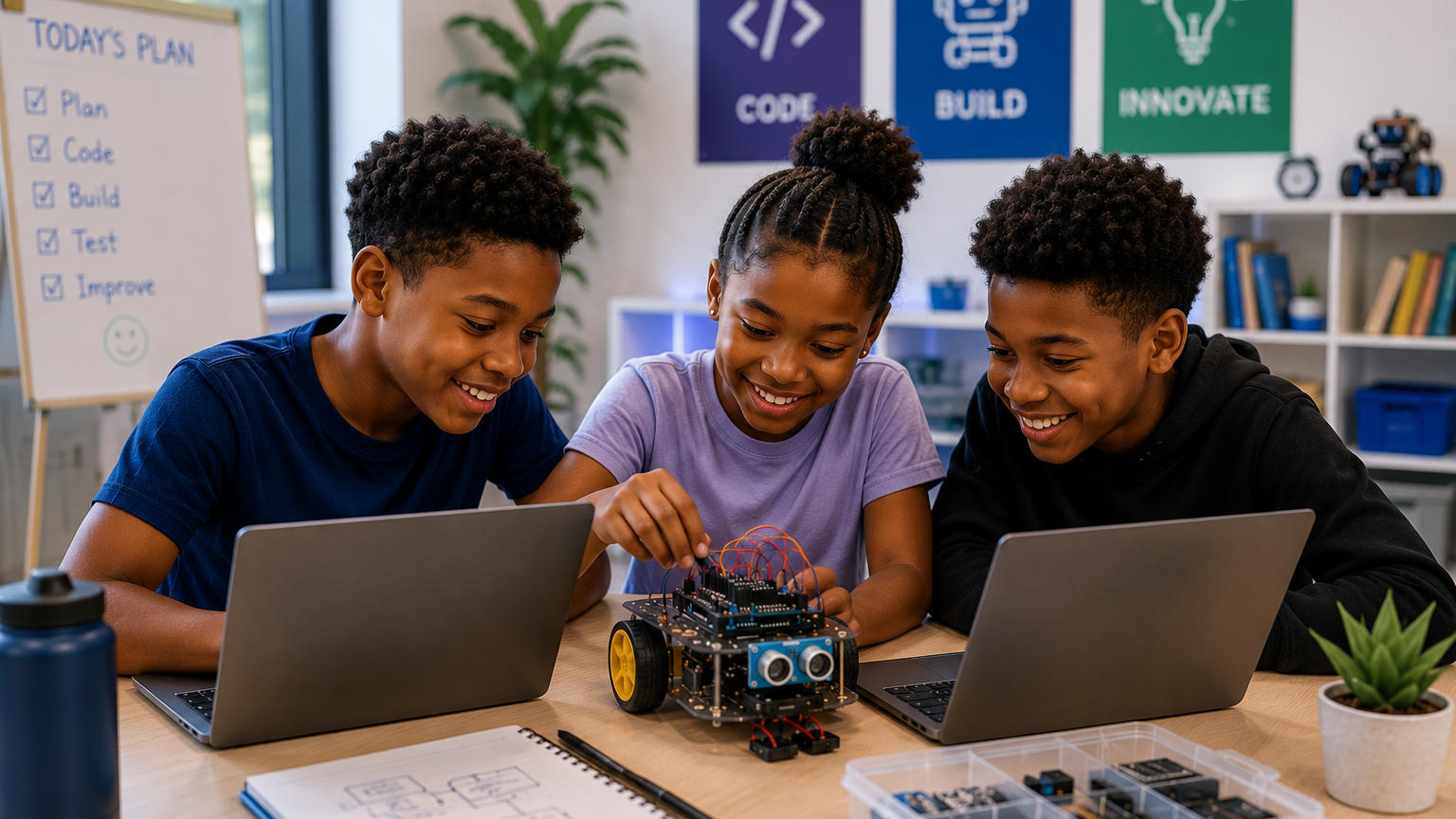
Summer Coding Camps for Kids: The Complete Parent Guide
School holidays give children time to rest, play and explore interests that may not receive much attention during the regular school term.
A well-designed summer coding camp allows children to use part of that time to create games, websites, applications, robots, animations and artificial intelligence projects. Instead of spending the entire holiday consuming technology, learners begin to understand how digital products work and how to build their own.
However, summer coding camps vary widely.
Some programmes offer structured projects, qualified instructors, small classes and clear learning outcomes. Others provide little more than prolonged screen time, copied activities or unstructured access to devices.
Parents therefore need to look beyond attractive advertising and ask what their child will actually learn, build and experience.
This guide explains how summer coding camps work, which programmes are suitable for different ages, what children can create, how to compare physical and online options and what parents should check before registering.
A summer coding camp is a structured holiday programme where children learn coding, robotics, artificial intelligence, game development and other technology skills through guided projects. The best camp should match the child’s age, interests, experience and learning needs.
What Is a Summer Coding Camp?
A summer coding camp is a short-term holiday programme that teaches children and teenagers how to create with technology.
Depending on the provider, learners may study:
- Scratch programming
- Python
- Website development
- Artificial intelligence
- Machine learning
- Robotics
- Digital electronics
- Game development
- Roblox Studio
- Mobile app development
- Minecraft coding
- UI/UX design
- Video editing
- Creative design
- Communication and presentation skills
Summer coding camps may be delivered:
- In person
- Online
- Through a hybrid model
- As a day camp
- As a residential camp
- In small groups
- Through individual instruction
The best programmes combine direct teaching with practical projects. Learners should not spend the entire camp watching an instructor or copying code from the screen. They should make decisions, solve problems, test ideas and build something they can explain.
Is Summer Coding Camp Worth It?
A summer coding camp can be worthwhile when it provides appropriate instruction, practical activities and clear outcomes.
The value does not come from placing a child in front of a computer for several hours. It comes from helping the learner move from passive technology use to active creation.
A good programme can help children:
- Develop basic coding knowledge
- Practise logical thinking
- Build confidence with technology
- Discover new interests
- Complete practical projects
- Improve problem-solving ability
- Learn to work with others
- Present their ideas
- Use holiday time productively
- Prepare for more advanced STEM learning
The outcome should not be judged only by whether the child receives a certificate.
A more useful question is:
What can my child now understand, create or explain that they could not do before the camp?
A child who can demonstrate a game, describe how a robot responds to a sensor or explain how a website was structured has gained more than a learner who merely attended every session.
Why Summer Is a Good Time for Children to Learn Coding
Children often have more flexible schedules during school holidays. This allows them to explore technology without balancing regular homework, tests and school activities.
More Time for Focused Projects
Coding projects often require learners to plan, build, test and make corrections. During a school term, lessons may be separated by long gaps or interrupted by academic demands.
A summer programme can give learners enough time to complete a project from beginning to end.
Reduced Academic Pressure
Children may be more willing to experiment when the programme is not tied to grades or examinations.
They can try ideas, make mistakes and improve their work without feeling that every error will affect their school performance.
Opportunity to Explore Interests
A child may enjoy playing games but may never have considered designing one.
Another child may be curious about robots, websites, artificial intelligence or mobile applications but may not have access to structured instruction during the term.
Summer camp allows children to test these interests before committing to a longer programme.
A Productive Alternative to Passive Screen Time
Many children already spend part of their holidays watching videos, playing games or browsing social platforms.
A coding camp does not necessarily reduce all screen use, but it can change the purpose of that screen time.
The learner moves from watching to building, from clicking to designing and from playing a game to understanding how it works.
Preparation for Continued Learning
A short holiday programme can serve as an introduction to a year-round course.
The child may discover that they want to continue learning Python, Scratch, robotics, game development or AI after the camp.
What Do Children Actually Do at Summer Coding Camp?
Activities should vary according to age, experience and course selection.
A typical project-based camp may include:
- Instructor demonstrations
- Guided practice
- Short challenges
- Independent project work
- Team activities
- Testing and debugging
- Project improvement
- Presentations or showcase sessions
Children should spend a meaningful part of each lesson creating.
Scratch Programming and Animation
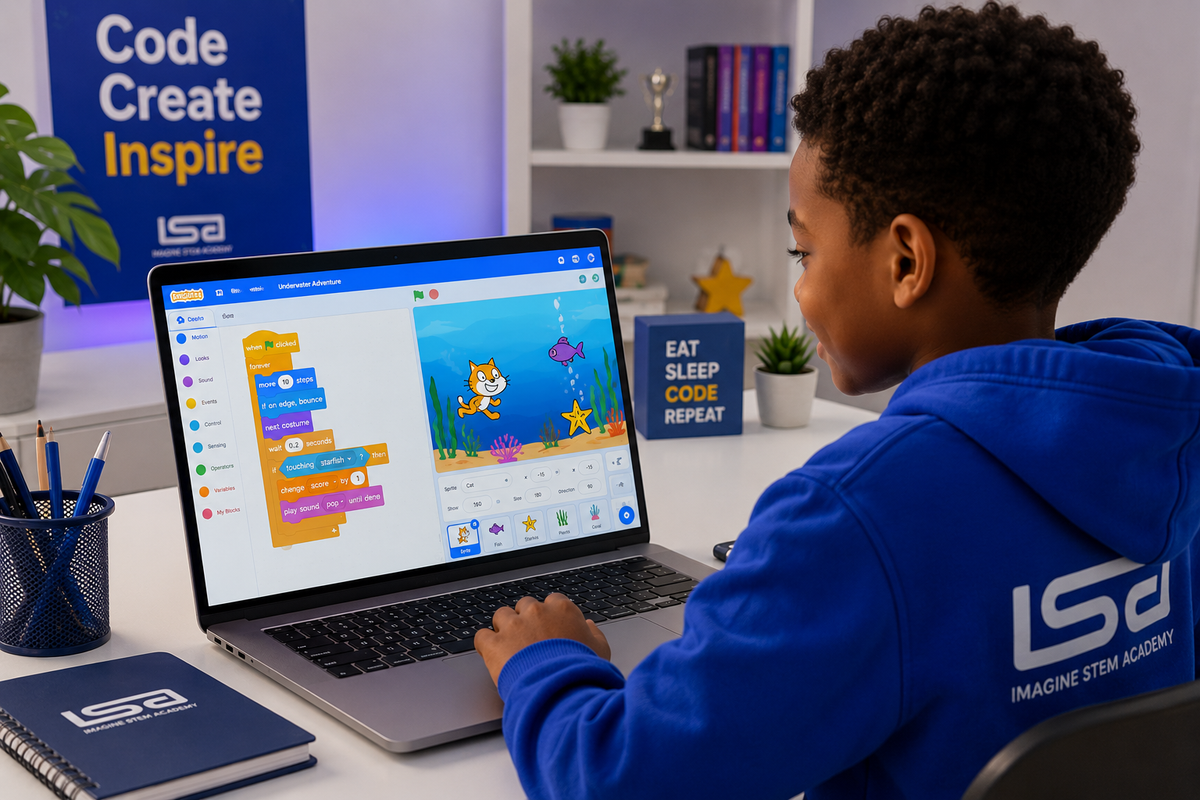
Scratch is a visual programming platform commonly used for younger beginners.
Learners connect colourful blocks to control characters, backgrounds, sounds, movement and game rules.
Children may create:
- Animated stories
- Quizzes
- Maze games
- Catching games
- Interactive greetings
- Educational games
- Digital comics
- Simple simulations
Scratch can introduce:
- Sequences
- Events
- Loops
- Conditions
- Variables
- Coordinates
- Broadcast messages
- Debugging
A summer Scratch project should go beyond copying an instructor’s finished game. Learners should have opportunities to choose characters, change rules, add features and explain how the blocks work.
Python Programming
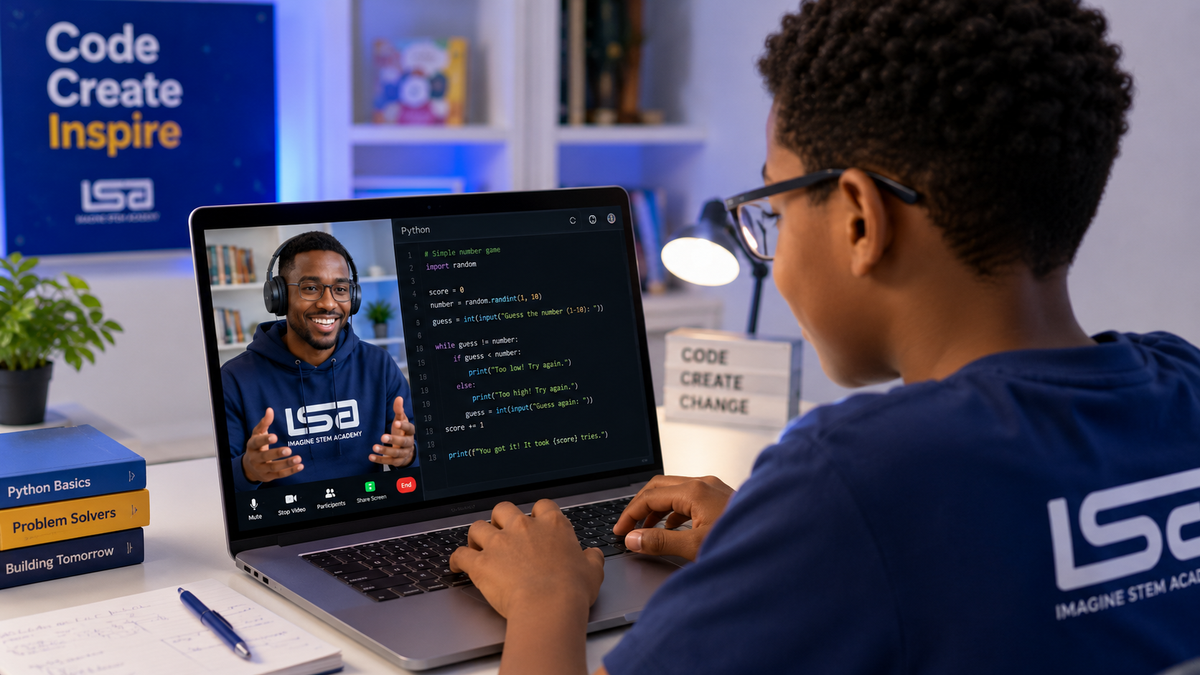
Python is a text-based programming language suitable for older children, teenagers and experienced younger learners.
At a beginner summer coding camp, learners may create:
- Number-guessing games
- Digital quizzes
- Calculators
- Text adventures
- Password generators
- Drawing programmes
- Basic chatbots
- Simple data projects
Python requires learners to pay more attention to typing, spelling, punctuation and syntax than visual coding.
A well-paced camp should therefore teach one concept at a time and use small projects to reinforce it.
Typical beginner concepts include:
- Variables
- Input and output
- Data types
- Conditions
- Loops
- Lists
- Functions
- Error handling
- Debugging
Website Development
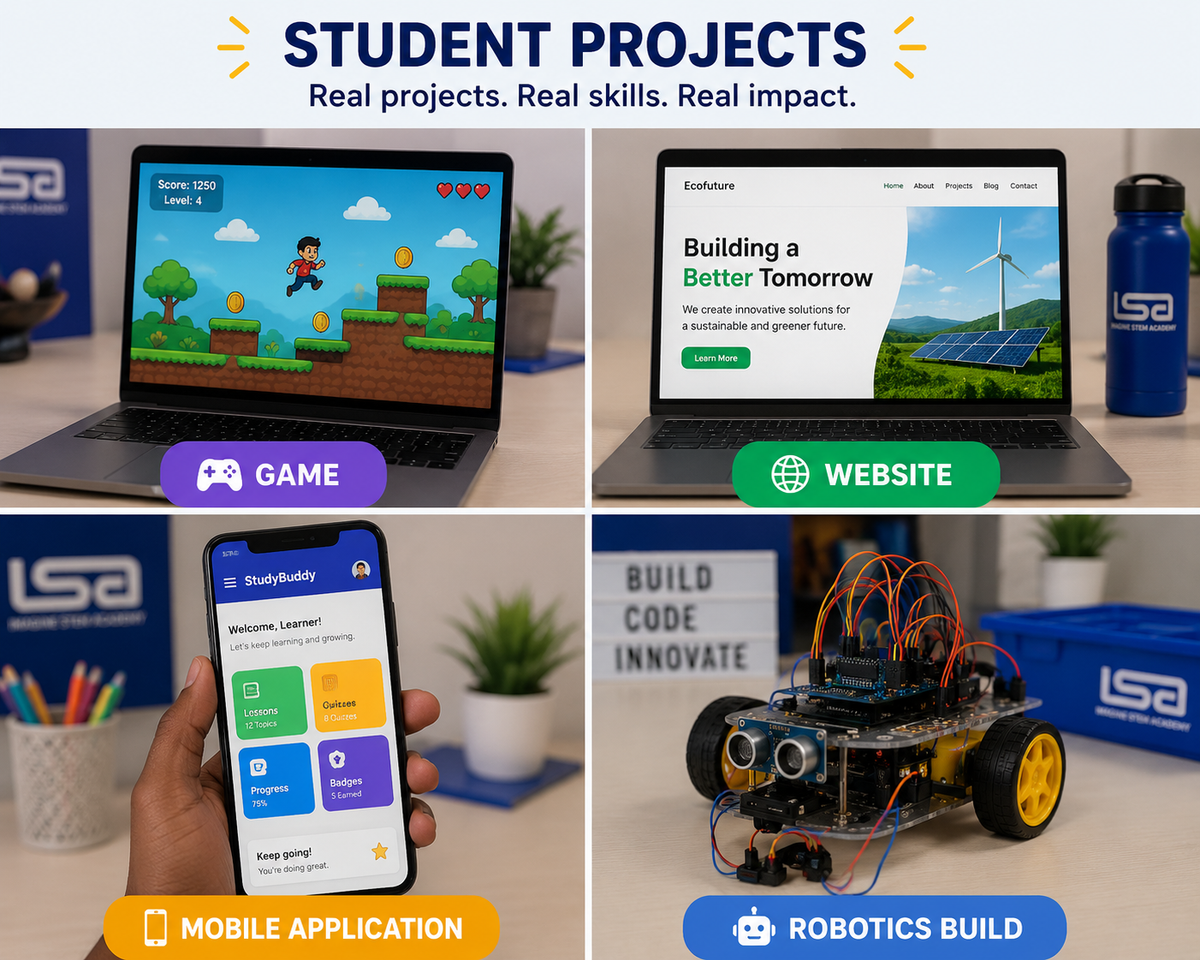
Website development gives learners a practical introduction to how web pages are created.
Students may learn:
- HTML for page structure
- CSS for styling
- JavaScript for interaction
- Navigation
- Images and links
- Forms
- Responsive layouts
- Basic accessibility
Possible projects include:
- A personal profile website
- A school club website
- A portfolio
- A small business website
- An environmental awareness page
- An event landing page
- A simple interactive quiz
Website development is often suitable for learners who enjoy design, writing, business or visual creativity as well as coding.
Artificial Intelligence
Artificial intelligence classes for children should explain both what AI can do and where its limitations lie.
Age-appropriate AI camp activities may include:
- Understanding how machines identify patterns
- Exploring training data
- Creating simple chatbots
- Classifying images or sounds
- Testing prompts
- Comparing AI responses
- Identifying misinformation
- Discussing bias
- Learning responsible AI use
- Building simple machine-learning projects
Young learners may use visual AI platforms, while older learners may work with Python and data.
AI tools should support thinking rather than replace it. Children still need to make decisions, check answers and understand the project they are presenting.
Robotics and Electronics
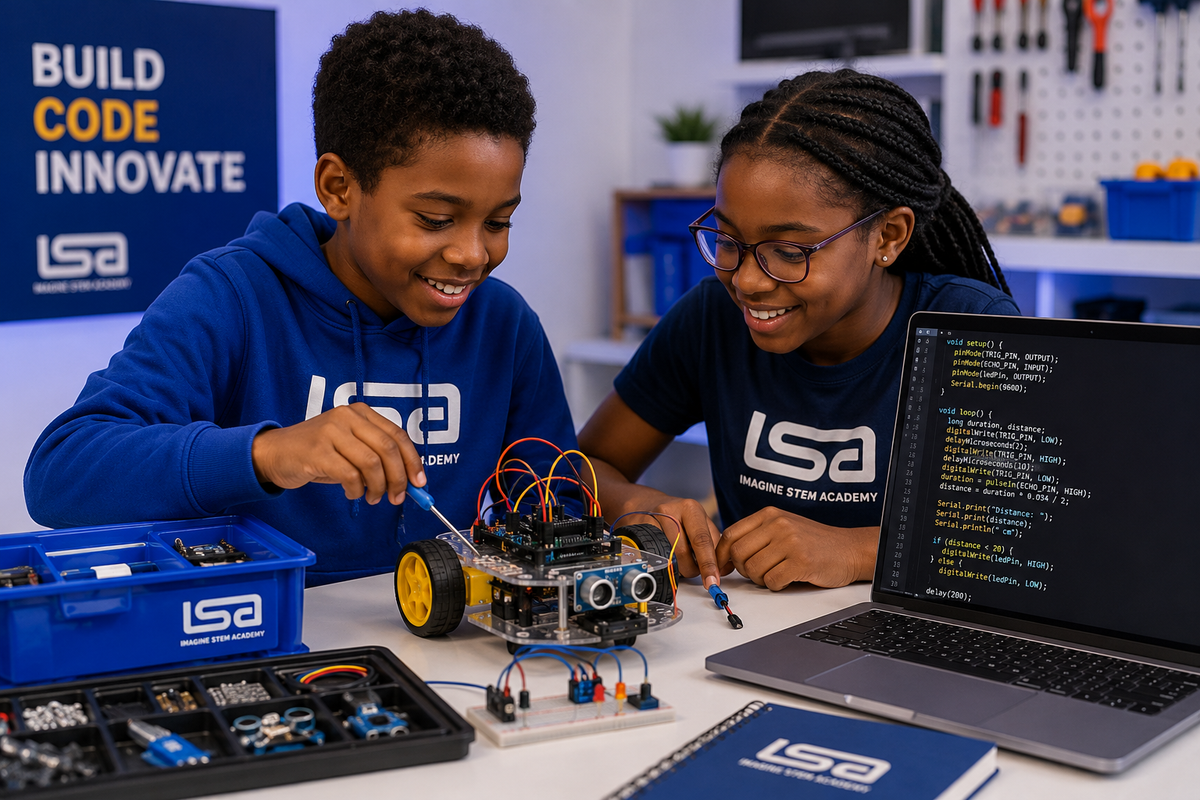
Robotics allows children to see code affect a physical device.
Learners may work with:
- Motors
- Wheels
- Sensors
- Lights
- Buzzers
- Microcontrollers
- Arduino boards
- Breadboards
- Wires
- Robotic vehicles
Projects might include:
- A line-following robot
- An obstacle-avoiding robot
- A motion-sensitive alarm
- A traffic-light system
- An automatic night light
- A distance sensor
- A temperature-monitoring device
- A simple smart-home model
Robotics is especially useful for learners who enjoy hands-on building and engineering.
The programme should still include coding. Simply assembling a pre-designed robot without understanding how it is programmed provides limited learning.
Mobile App Development
Children can use beginner-friendly app-development tools to design applications that respond to user input.
Possible projects include:
- A quiz app
- A revision app
- A calculator
- A habit tracker
- A simple game
- A school information app
- An emergency-contact tool
- A community problem-solving app
App development introduces:
- Screen design
- Buttons
- Events
- Variables
- Navigation
- Data storage
- User experience
- Testing
Older learners may progress to more advanced mobile-development frameworks.
Game Development
Game development can be an effective entry point because many children already understand how games work as players.
The camp should help them explore:
- Characters
- Levels
- Scoring
- Player controls
- Collisions
- Rewards
- Game rules
- Difficulty
- Testing
- User feedback
Depending on age and experience, children may use:
- Scratch
- Roblox Studio
- Lua
- Python
- JavaScript
- Unity
A strong game-development camp should balance creativity with coding fundamentals.
Roblox Coding
Roblox Studio allows learners to design interactive environments and programme behaviour using Lua.
Children may create:
- Obstacle courses
- Adventure games
- Simulations
- Multiplayer environments
- Collecting games
- Educational experiences
Parents should distinguish between playing Roblox and learning to build with Roblox Studio.
A proper Roblox coding camp should include:
- Game design
- Lua programming
- Testing
- Online safety
- Responsible community use
- Original project creation
Minecraft Coding
Minecraft-based coding activities can introduce programming through a familiar environment.
Learners may use code to:
- Build structures
- Automate repetitive tasks
- Create challenges
- Control characters
- Design interactive worlds
- Explore coordinates and logic
The educational value depends on whether the activity is tied to clear coding outcomes rather than unrestricted gameplay.
Creative and Communication Skills
Technology projects are more valuable when learners can explain their thinking.
Some camps include:
- Public speaking
- Project presentations
- Design thinking
- Storytelling
- Teamwork
- Leadership
- Creative design
- Video editing
- Digital content creation
These activities help children communicate what they have built and why it matters.
What Age Is Appropriate for Summer Coding Camp?
There is no universal starting age. The course should match the child’s reading level, attention span, confidence and previous experience.
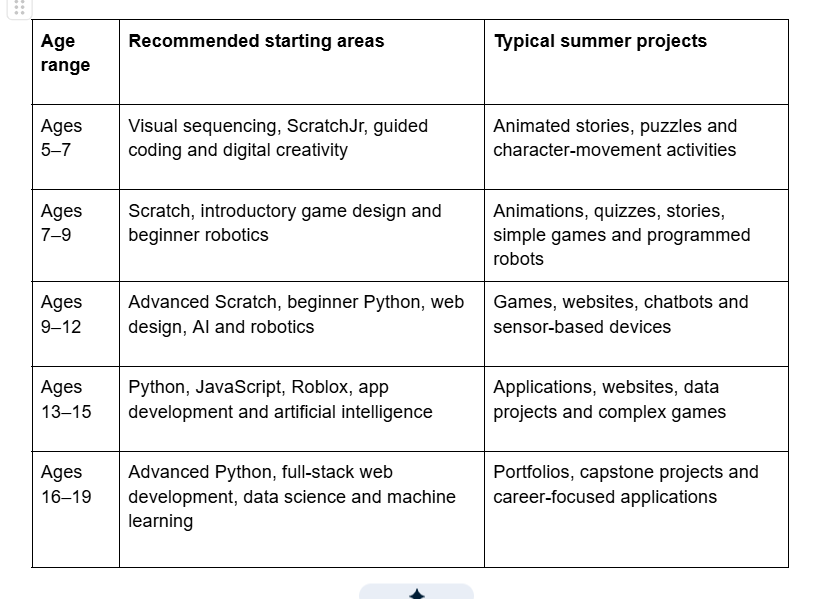
Age ranges should be treated as guidance rather than strict limits.
A ten-year-old with several years of Scratch experience may be ready for Python. A thirteen-year-old who has never coded may need a beginner course.
Placement should consider both age and experience.
Is Summer Coding Camp Suitable for Complete Beginners?
Yes, provided the camp clearly accepts beginners and teaches foundational concepts.
Parents should not assume that every advertised course starts from the beginning.
Before registering, ask:
- Is previous coding experience required?
- What does the first lesson cover?
- Are beginners placed separately from experienced learners?
- Will the instructor assess the child’s current level?
- Can the learner move to another group if the course is too easy or difficult?
A complete beginner should not be made to feel behind because other learners already know the platform.
Similarly, an experienced learner should not spend the entire camp repeating basic activities.
How Long Should a Summer Coding Camp Last?
Summer camps can range from a few days to several weeks.
The appropriate duration depends on the programme’s objectives.
One-Day or Weekend Workshop
Suitable for:
- Introducing a topic
- Testing a child’s interest
- Completing one small project
- Offering a technology experience
It is not usually enough for deep skill development.
One-Week Camp
Suitable for:
- An introduction to a tool
- A focused beginner project
- A short holiday experience
- Exploring a new interest
The programme should limit the number of topics. Attempting coding, robotics, AI, web design and app development in one week may produce only superficial exposure.
Two-Week Camp
Suitable for:
- Learning core concepts
- Completing a more developed project
- Testing and improving work
- Preparing a final presentation
Four- to Six-Week Camp
Suitable for:
- Structured progression
- Multiple projects
- Specialisation
- Portfolio development
- Team challenges
- Project showcases
Longer programmes should include variety, breaks and age-appropriate pacing.
How Long Should Each Camp Day Be?
The ideal schedule depends on age and activity type.
Younger children generally need:
- Shorter instructional blocks
- Frequent movement
- Simple project goals
- Breaks away from the screen
- More instructor guidance
Older children and teenagers can usually work for longer periods, particularly when activities include discussions, planning, building, testing and presentations.
A camp day should not consist of uninterrupted computer use.
A balanced day may include:
- Welcome activity
- Short instruction
- Guided coding
- Break
- Project challenge
- Team discussion
- Lunch or movement period
- Practical building
- Testing
- Reflection or presentation
Online, Physical or Hybrid Summer Coding Camp?
Each format has advantages and limitations.
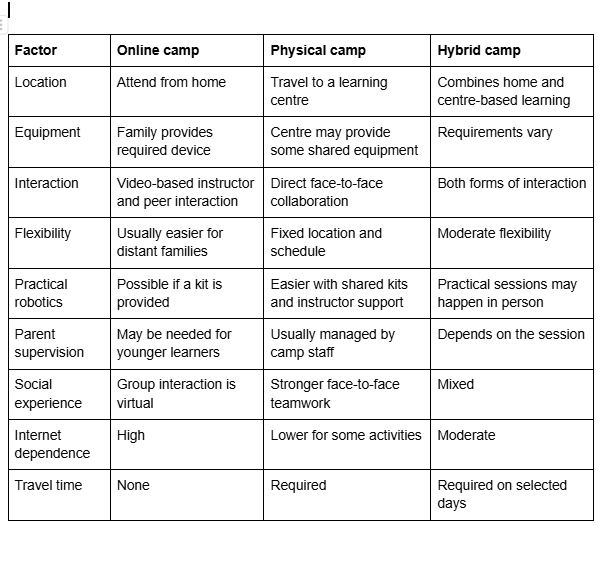
Choose an Online Camp When:
- The family lives far from the centre
- The child is comfortable learning online
- The programme offers live support
- A suitable laptop and internet connection are available
- The child prefers a familiar home environment
- The camp specialises in software-based subjects
Choose a Physical Camp When:
- The child benefits from direct supervision
- The programme includes robotics or electronics
- Social interaction is an important goal
- The learner needs a structured environment
- The family can manage transportation
Choose a Hybrid Camp When:
- The learner needs flexibility
- Some topics can be learned online
- Practical projects require occasional centre access
- The provider has a clear, coordinated programme
How Much Screen Time Is Healthy During Coding Camp?
Not all screen time has the same purpose.
Watching videos for entertainment is different from creating a game, writing a programme or designing a website. However, productive screen use still needs balance.
A responsible summer coding camp should include:
- Regular breaks
- Eye-rest periods
- Physical movement
- Discussions
- Planning on paper
- Robotics or building activities
- Teamwork
- Presentations
- Offline design exercises
Parents should ask how the camp manages long sessions and whether the schedule includes time away from the computer.
Young children should not be expected to remain seated and focused on a screen for several uninterrupted hours.
What Should a Child Bring to Summer Coding Camp?
Requirements differ by programme, but children may need:
- A laptop
- Laptop charger
- Computer mouse
- Headphones
- Notebook
- Pens or pencils
- Water bottle
- Packed meal or snack
- Robotics kit, where required
- Extension cable, if requested
- Reliable internet for online camps
- Webcam and microphone
- Comfortable clothing
- Any required login information
Parents should receive a complete equipment list before camp begins.
Does My Child Need a Laptop?
Most coding camps require a laptop or desktop computer.
Tablets may support some beginner activities, but they are usually not suitable for:
- Python programming
- Advanced Scratch projects
- Website development
- Roblox Studio
- App development
- File management
- Most robotics software
- Full coding environments
Before registration, confirm whether:
- Learners must bring their own laptops
- Devices are provided
- Devices are shared
- Required software works on Windows, macOS or Chromebook
- Installation support is available
- The child needs administrator access to install programmes
What Makes a Great Summer Coding Camp?
Age-Appropriate Curriculum
The content should suit the learner’s developmental stage.
Younger children need visual activities, clear instructions and short challenges. Teenagers need more independence, meaningful applications and increasingly advanced tools.
Project-Based Learning
Every major concept should connect to a practical activity.
Children should build, test and improve projects rather than only watch demonstrations.
Qualified Instructors
A good instructor should understand both the subject and how to teach children.
Look for instructors who can:
- Explain simply
- Ask guiding questions
- Adapt lessons
- Encourage experimentation
- Manage group learning
- Give useful feedback
- Maintain appropriate safeguarding standards
Manageable Class Sizes
Smaller groups make it easier for instructors to observe each learner’s progress.
Ask for the actual instructor-to-student ratio rather than accepting descriptions such as “interactive classes.”
Clear Outcomes
The provider should explain what learners will create or understand.
For example:
By the end of the camp, the learner will be able to design and present an original Scratch game using events, loops, conditions and variables.
This is more useful than:
Your child will become a coding expert.
Original Student Work
Children should have some freedom to make choices.
Every project does not need to look identical.
Original features, themes, designs and solutions provide evidence that learners understood and applied the concepts.
Regular Feedback
Feedback may include:
- Instructor comments
- Progress reports
- Skills checklists
- Project reviews
- Parent updates
- Presentations
- Portfolios
Safe Learning Environment
Parents should understand:
- Who supervises the children
- How instructors are selected
- Which communication platforms are used
- Whether lessons are recorded
- How photographs are handled
- Whether children can communicate privately with instructors
- How behaviour concerns are managed
- How learner data is protected
Balanced Schedule
A strong camp should combine instruction, practical work, breaks, collaboration and presentations.
Final Showcase
A project showcase can motivate learners and help parents see what they created.
Children should be encouraged to explain:
- The problem
- Their idea
- How the project works
- What was difficult
- How they solved problems
- What they would improve next
Warning Signs of a Weak Coding Camp
Parents should be cautious when:
- Learning outcomes are unclear
- Every course claims to be suitable for every age
- The provider promises instant mastery
- Children mainly watch videos
- Instructors complete the projects for learners
- Class sizes are not disclosed
- There is no parent communication
- The programme focuses only on certificates
- The provider cannot explain its safeguarding process
- Learners spend the entire day on screens without breaks
- The same generic project is used for all ability levels
- Marketing claims cannot be verified
- The provider pressures parents to pay without answering questions
Questions to Ask Before Registering
Ask the provider:
- Which ages is the programme designed for?
- Is it suitable for complete beginners?
- How are learners grouped?
- How many children are in each class?
- How many instructors support each group?
- Are the lessons live?
- What projects will my child complete?
- Will the child create an original project?
- What equipment is required?
- Must learners bring laptops?
- Are robotics kits provided?
- Which software will be used?
- Is the software free?
- What happens if my child misses a day?
- Are makeup lessons available?
- How are parents updated?
- Is there a final presentation?
- How is progress assessed?
- What qualifications do instructors have?
- What child-safety procedures are in place?
- Are photographs or videos taken?
- Is parental permission required for media use?
- What happens if the course is too easy or difficult?
- Is the certificate based on attendance or achievement?
- Can learners continue after camp?
Clear answers indicate that the provider has thought carefully about the learning experience.
How to Choose the Right Camp
Subject
The child’s interests can help determine the best starting point.
Choose Scratch When the Child:
- Is a beginner
- Enjoys stories or animation
- Likes colourful visual activities
- Wants to make simple games
- Is still developing typing confidence
Choose Python When the Child:
- Is ready for text-based programming
- Enjoys logic and problem-solving
- Wants to explore AI or data
- Has completed visual coding
- Is an older beginner
Choose Robotics When the Child:
- Likes building
- Enjoys machines
- Wants to see code produce physical movement
- Prefers practical activities
- Is interested in engineering or electronics
Choose Website Development When the Child:
- Enjoys visual design
- Wants to create something shareable
- Is interested in online businesses
- Likes writing and organising information
- Wants to build a portfolio
Choose App Development When the Child:
- Wants to create mobile tools
- Enjoys solving everyday problems
- Is interested in entrepreneurship
- Likes user-interface design
- Wants to build interactive applications
Choose Game Development When the Child:
- Enjoys games
- Wants to create characters and levels
- Likes storytelling
- Is interested in animation
- Wants an engaging introduction to coding
Choose AI When the Child:
- Is curious about chatbots
- Wants to understand modern technology
- Enjoys experimenting with data or prompts
- Is ready to discuss responsible technology use
- Wants to progress towards machine learning
Signs Your Child May Enjoy Summer Coding Camp
Your child may enjoy camp if they:
- Ask how games or applications work
- Enjoy puzzles
- Like building with blocks or construction sets
- Create stories or drawings
- Spend time customising games
- Enjoy solving problems
- Ask questions about robots
- Are curious about AI
- Like experimenting
- Prefer making things to only watching them
- Show patience when correcting mistakes
- Enjoy explaining ideas
A child does not need to already be “good with computers.”
Curiosity is often a more useful starting point than technical experience.
How Parents Can Prepare Children for Camp
Discuss What the Child Wants to Learn
Ask which type of project sounds interesting.
Giving learners some ownership increases engagement.
Check the Equipment Early
Do not wait until the first morning to discover that:
- The laptop does not work
- The software cannot be installed
- The charger is missing
- The camera is disabled
- The child has forgotten a password
Practise Basic Computer Skills
Younger learners may benefit from practising:
- Using a mouse
- Typing
- Opening a browser
- Switching windows
- Saving files
- Joining a video call
- Using headphones
Set Realistic Expectations
The child will not master every aspect of coding in one camp.
The goal is to build understanding, complete projects and identify areas for further learning.
Encourage Questions
Tell the child that being stuck is normal.
Coding includes errors, testing and correction.
How Parents Can Support Learning During Camp
Ask questions such as:
- What did you build today?
- Which part was most difficult?
- What error did you find?
- How did you fix it?
- What would you add next?
- Can you explain your code?
- What did your group work on?
- What are you preparing for the showcase?
Avoid taking over the project.
The child’s imperfect but independently created work is more valuable than a polished project completed by an adult.
What Should Children Have at the End of Camp?
Depending on duration and subject, learners should leave with some combination of:
- A completed game
- A website
- A mobile application
- A Python programme
- A Scratch animation
- A chatbot
- A robotics project
- A digital portfolio
- Improved coding knowledge
- Project-presentation experience
- Instructor feedback
- A certificate
- A recommended next learning step
Parents should request access to project files or portfolio links where possible.
What Should Happen After Summer Coding Camp?
Camp should be treated as a starting point, not the end of the learning journey.
Possible next steps include:
- Continuing the same subject
- Joining weekly classes
- Completing an intermediate course
- Improving the summer project
- Starting a new independent project
- Entering a coding competition
- Joining a school STEM club
- Building a digital portfolio
- Progressing from Scratch to Python
- Moving from basic AI concepts to machine learning
The provider should be able to recommend an appropriate pathway.
Summer Coding Camps in Nigeria
Families searching for a summer coding camp in Nigeria should consider practical local factors.
These include:
- Reliable power
- Internet access
- Travel distance
- Traffic
- Device requirements
- Lesson schedules
- Payment options
- Centre security
- Instructor availability
- Local support
- Missed-class policies
A Nigerian provider may also offer:
- Naira payment
- West Africa Time schedules
- Familiar school-calendar planning
- Local examples
- Easier parent communication
- In-person support
- Opportunities to continue learning after camp
Parents should still assess quality using the same standards applied to international programmes.
Summer Coding Camps in Lagos
When searching for coding camps in Lagos, location is important because daily travel can affect punctuality and the child’s energy.
Parents should confirm:
- The exact centre address
- Drop-off and pickup procedures
- Parking
- Security
- Emergency contact procedures
- Lunch arrangements
- Class start and closing times
- Traffic considerations
- Whether multiple locations offer the same curriculum
- Whether online participation is available
Families in areas such as Surulere, Ikeja and neighbouring communities may prefer a centre that reduces travel time.
Online Summer Coding Camps for International Families
Online camps allow children to participate from different countries.
Parents should confirm:
- Time zone
- Daylight-saving differences
- International payment options
- Internet requirements
- Class size
- Instructor availability
- Recording policy
- Rescheduling rules
- Required software
- Whether the programme ships any physical kits
Online participation can be especially useful for diaspora families looking for structured classes led by African educators or opportunities for their children to learn alongside diverse peers.
Why Families Choose Imagine STEM Academy
Imagine STEM Academy provides technology and STEM learning programmes for children and teenagers aged 5–19.
ISA summer programmes are designed to help learners build practical projects while developing technical, creative and communication skills.
Depending on the selected programme, children may explore:
- Scratch programming
- Python
- Artificial intelligence
- Robotics
- Game development
- Website development
- Mobile applications
- Creative design
- Video editing
- Digital electronics
- Public speaking
- Leadership
The learning approach emphasises:
- Live instruction
- Guided projects
- Hands-on activities
- Problem-solving
- Testing and debugging
- Original work
- Instructor support
- Project presentation
- Clear progression
ISA offers programmes designed for different ages and levels rather than placing every learner into the same activity.
Recommended ISA Summer Learning Path
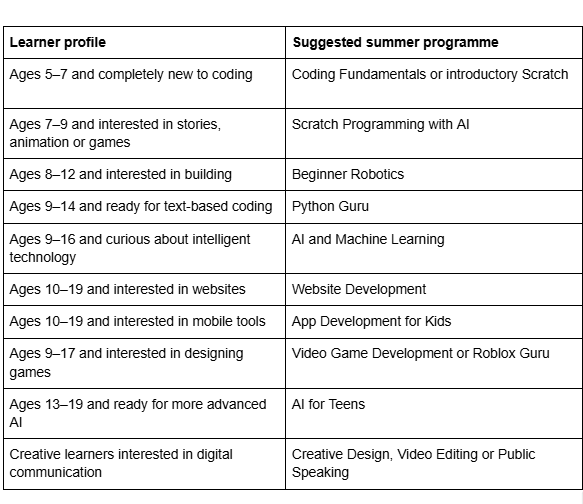
Placement should be based on age, experience and interest.
Register for Imagine STEM Academy’s Summer Tech Camp
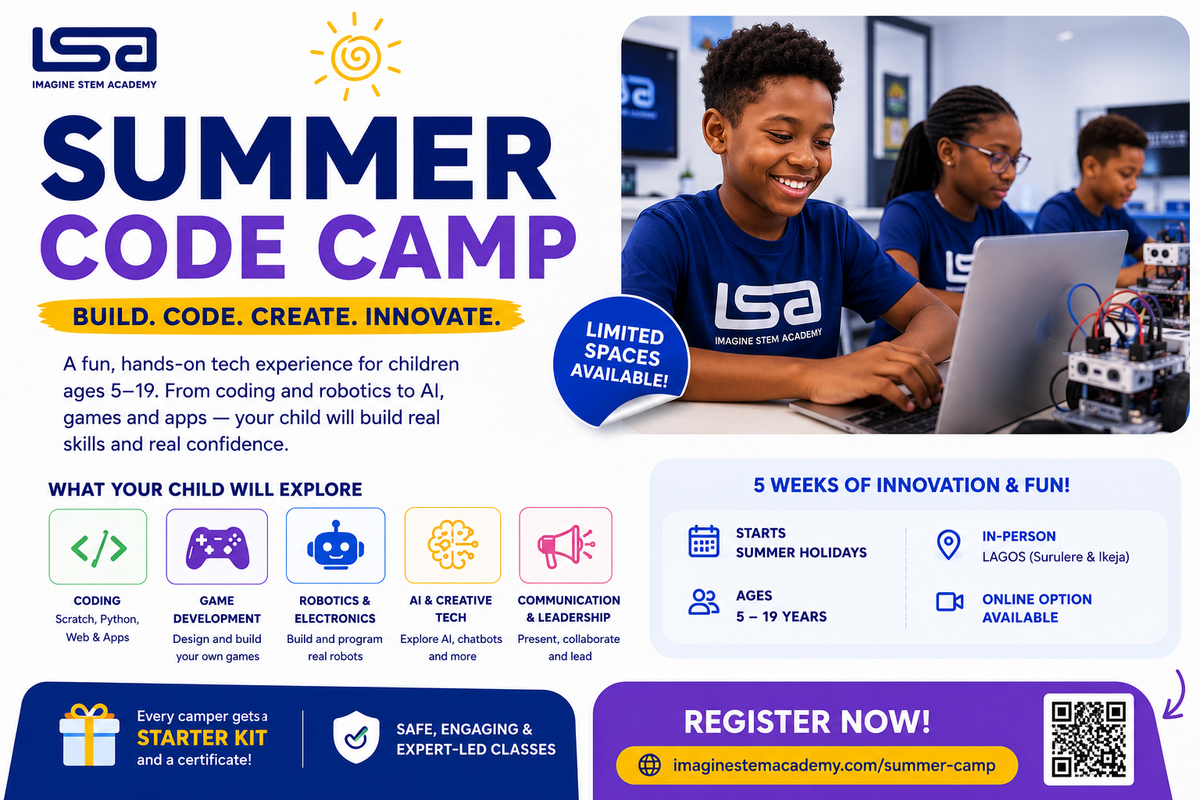
Imagine STEM Academy’s Summer Tech Camp gives children and teenagers an opportunity to explore practical technology skills during the school holidays.
Learners can build projects, receive instructor support and discover pathways in coding, robotics, artificial intelligence, game development and digital creativity.
The programme is suitable for beginners and continuing learners, with course recommendations based on age and experience.
Help Your Child Build Something Meaningful This Summer:
Give your child a structured, practical holiday experience where they can learn, create and present real technology projects.
Frequently Asked Questions
What is a summer coding camp?
A summer coding camp is a holiday programme where children learn programming, robotics, AI, game development and other technology skills through structured lessons and projects.
Is coding camp suitable for beginners?
Yes. Many camps provide beginner-level courses, but parents should confirm the entry requirements before registering.
What is the best age to start coding camp?
Children can begin age-appropriate activities from approximately age five. The correct course depends on reading ability, attention span, confidence and previous experience.
Does my child need to know coding before camp?
Not usually. Beginner camps should introduce foundational concepts. Advanced courses may require previous experience.
What will my child build?
Projects may include games, websites, applications, robots, animations, chatbots, Python programmes and AI projects.
Does my child need a laptop?
Most coding camps require a laptop. Some providers supply devices, but parents should confirm this before registration.
Can a tablet be used?
A tablet may support some introductory activities, but a laptop is generally required for Python, website development, Roblox Studio, app development and advanced coding.
Are robotics kits included?
This depends on the provider. Some camps provide shared kits, some require learners to purchase a kit and others include equipment in the fee.
How long is a summer coding camp?
Camps may last from one day to several weeks. Longer programmes usually provide more time for skill development and project completion.
Is online coding camp effective?
Online camp can be effective when lessons are live, class sizes are manageable and learners receive practical support and feedback.
Is physical camp better than online camp?
Neither format is automatically better. The right choice depends on the child’s learning style, location, equipment, supervision needs and chosen subject.
How much screen time will my child have?
This depends on the programme. A balanced camp should include breaks, discussions, planning, movement and practical activities.
Is summer coding camp only for children who like computers?
No. Coding connects with storytelling, design, games, engineering, problem-solving, business and creativity.
Can girls attend coding camp?
Yes. Coding, robotics, AI and digital creation are suitable for children of all genders.
Will my child receive a certificate?
Many programmes provide certificates. Parents should ask whether the certificate reflects attendance, project completion or assessed achievement.
What happens if my child misses a day?
Policies differ. Ask whether recordings, makeup lessons, notes or instructor support are available.
Can siblings attend together?
Usually, but they may be placed in different groups based on age and skill level.
Will my child build an original project?
A strong camp should allow learners to personalise projects and apply concepts independently.
How do I know my child is learning?
Look for completed projects, clearer explanations, improved debugging, greater independence and instructor feedback.
Can my child continue after camp?
Yes. Many learners continue through weekly classes, intermediate courses or longer learning pathways.
Is camp only about coding?
Some technology camps also include robotics, AI, design, communication, teamwork and leadership.
How do I choose the right course?
Consider the child’s age, experience, interests, attention span and preferred way of learning. A placement assessment can help.
What should my child bring?
Common requirements include a laptop, charger, mouse, headphones, notebook, water bottle and any requested robotics materials.
How early should I register?
Register early enough to confirm availability, complete software setup and prepare the required equipment. Avoid waiting until the first day.
Final Advice for Parents
The best summer coding camp is not necessarily the one with the longest list of courses, the most advanced terminology or the biggest promise.
Choose a programme that:
- Matches your child’s age and experience
- Uses qualified instructors
- Maintains manageable class sizes
- Provides practical projects
- Includes clear learning outcomes
- Offers regular support
- Protects children
- Balances screen time
- Encourages original thinking
- Communicates with parents
- Provides a clear next step after camp
A good summer coding camp should help children return home able to show what they created, explain how it works and describe what they want to build next.