How to Teach Your Child Coding: The Complete Parent Guide
How to Teach Your Child Coding: The Complete Parent Guide
Many parents know coding is becoming an important skill.
Artificial intelligence is changing how people work. Technology influences almost every profession. Schools are introducing more digital learning. Children are growing up surrounded by smartphones, computers, robots and intelligent software.
Yet one question continues to come up again and again.
"I'd love my child to learn coding… but where do I even start?"
Some parents worry they know nothing about programming.
Others think coding is only for children who are exceptionally good at mathematics.
Some assume they need to buy expensive robots, computers or software before their child can begin.
None of these assumptions are true.
The reality is that thousands of children begin learning coding every year with simple activities, beginner-friendly tools and guidance from parents who have never written a line of code themselves.
Teaching your child coding is much less about becoming a programming expert and much more about creating an environment where curiosity, creativity and problem-solving can grow.
Whether your child dreams of creating video games, building robots, designing websites, developing mobile apps or simply understanding how technology works, coding provides a strong foundation.
This guide explains exactly where to begin, what tools to use, which programming language to choose first and how to help your child enjoy learning coding at home.
Teaching your child coding starts with choosing age-appropriate tools, encouraging creativity and building small projects consistently. Parents do not need programming experience to help children begin learning coding successfully.
Why Are More Parents Teaching Their Children Coding?
Twenty years ago, computer literacy often meant learning how to type or use office software.
Today, technology has become far more interactive.
Children no longer only consume technology—they can create it.
Coding gives them the opportunity to build:
- Games
- Websites
- Mobile applications
- Robots
- Artificial intelligence projects
- Interactive stories
- Digital art
- Smart devices
More importantly, coding develops thinking skills that extend beyond computers.
A child learning programming practises how to:
- Break large problems into smaller parts
- Look for patterns
- Test different solutions
- Learn from mistakes
- Organise ideas logically
- Explain their thinking
- Improve projects through feedback
These abilities remain valuable whether the child eventually becomes an engineer, doctor, architect, entrepreneur, designer or teacher.
Coding is therefore better viewed as a way of developing problem-solving and creativity rather than simply learning another school subject.
Does My Child Need to Become a Software Engineer?
Not at all.
One of the biggest misconceptions surrounding coding is that every child who learns programming is expected to become a professional developer.
That is not the goal.
Think about learning music.
Most children who learn piano never become concert pianists.
Yet music still develops discipline, listening skills, creativity and confidence.
The same applies to coding.
Learning programming helps children understand the digital world around them while developing useful thinking habits.
Even children who later pursue careers outside technology often benefit from the logical thinking, persistence and creativity that coding encourages.
Do Parents Need to Know Coding?
This is probably the biggest concern parents have.
The answer is simple:
No.
You do not need to know Python.
You do not need to understand JavaScript.
You do not need to build websites.
You do not need to understand artificial intelligence.
In fact, many children begin learning coding successfully while their parents learn alongside them.
Instead of becoming the teacher, parents become facilitators.
Your role changes from:
"I have all the answers."
to
"Let's figure this out together."
Children often enjoy this approach because it allows them to experiment without worrying about making mistakes.
Some of the most valuable questions parents can ask include:
- What are you trying to build?
- How do you think that works?
- What happens if you change this?
- Why do you think that error appeared?
- What could you try next?
- Can you explain your project to me?
Notice that none of these questions require programming knowledge.
They simply encourage thinking.
What Exactly Is Coding?
Before teaching children coding, it helps to understand what coding actually is.
Coding is simply writing instructions that tell a computer what to do.
Those instructions might tell a computer to:
- Move a character
- Display a picture
- Play music
- Count points
- Open a webpage
- Turn on a robot's motor
- Recognise an image
- Save information
- Solve a problem
Computers cannot guess what people want.
They only follow instructions.
Programming languages allow humans to write those instructions in ways computers can understand.
Different languages are designed for different purposes, but they all share common ideas such as:
- Variables
- Sequences
- Loops
- Conditions
- Functions
- Events
Children who understand these concepts can later move between programming languages much more easily.
That is why learning programming concepts is often more important than memorising a particular language.
What Is the Best Age to Start Coding?
There is no single perfect age.
Instead, the best time depends on three factors:
- Reading ability
- Attention span
- Interest
Many children can begin age-appropriate coding activities from around five years old.
The key is choosing the right tools.
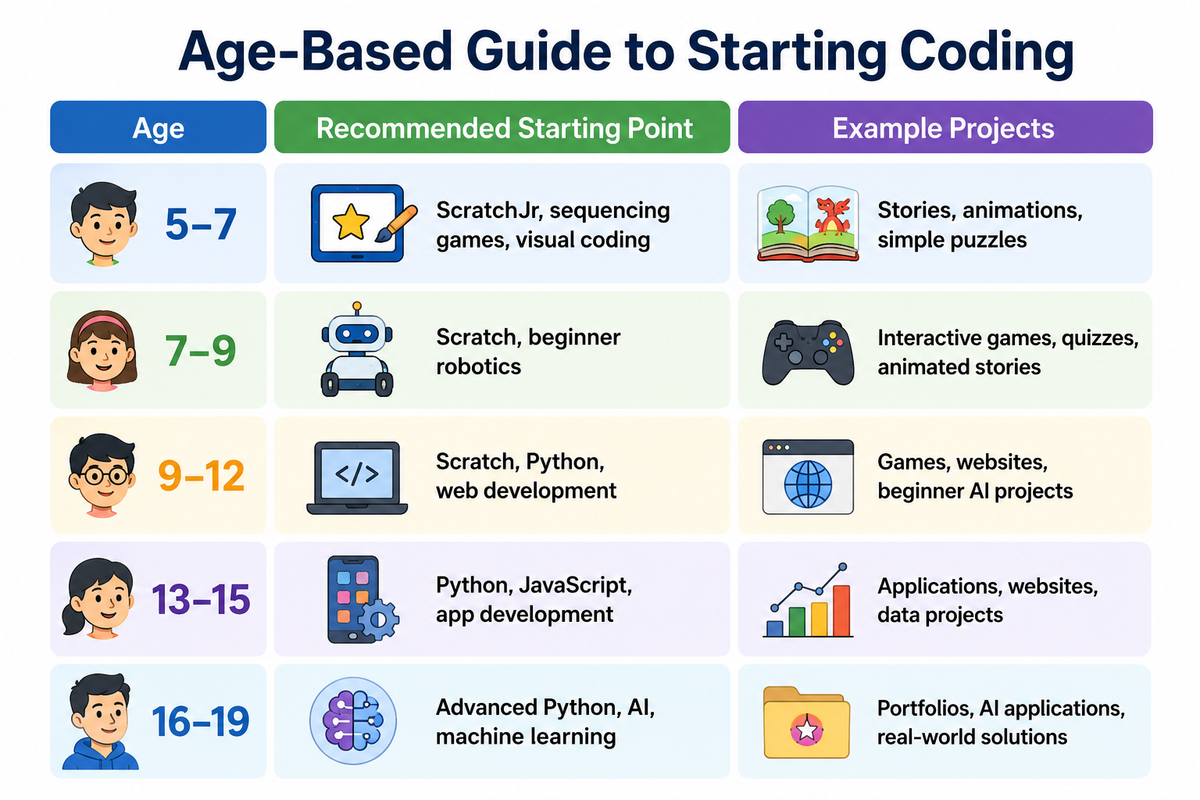
Age should never be the only deciding factor.
Some younger learners progress quickly because they enjoy experimenting.
Others may need more time before moving beyond visual programming.
Learning should always follow the child rather than forcing the child to follow a rigid curriculum.
Where Should Beginners Start?
One of the biggest mistakes parents make is choosing the most advanced-looking course first.
Many adults hear people talking about Python, artificial intelligence or cybersecurity and assume children should begin there.
In reality, learning coding is similar to learning a spoken language.
You would not expect a child to write novels before learning the alphabet.
Programming follows the same principle.
Children should first become comfortable with basic ideas before progressing to more complex concepts.
For many beginners, a practical learning pathway looks like this:
- Computational thinking
- Visual programming
- Simple projects
- Independent projects
- Text-based programming
- Specialisation
Trying to skip these stages often creates frustration.
Start with Computational Thinking
Before children write code, they should learn how to think like problem solvers.
Computational thinking involves:
Breaking problems into smaller steps.
Looking for patterns.
Ignoring unnecessary information.
Creating clear instructions.
Testing ideas.
Improving solutions.
Interestingly, children can develop these skills without touching a computer.
Activities such as:
- Building LEGO models
- Following treasure maps
- Solving puzzles
- Board games
- Sequencing cards
- Giving directions
- Organising recipes
all help develop computational thinking.
These experiences prepare children for programming later.
Should My Child Start with Scratch?
For most younger beginners, yes.
Scratch was developed by the MIT Media Lab specifically to introduce children to programming through colourful drag-and-drop blocks.
Instead of worrying about spelling commands correctly, children concentrate on understanding logic.
Using Scratch, children can build:
- Games
- Stories
- Animations
- Music projects
- Quizzes
- Interactive presentations
Scratch teaches important programming concepts including:
- Events
- Loops
- Variables
- Conditions
- Coordinates
- Messages
- Debugging
Many professional programmers began with Scratch or similar visual environments before moving to text-based languages.
Learning Scratch does not slow children down.
It prepares them.
When Should Children Move to Python?
Parents often ask whether Scratch should be skipped in favour of Python.
Usually, the answer is no.
Python becomes much easier once children understand the underlying ideas.
Instead of spending mental energy remembering punctuation and spelling, they can focus on solving problems.
Children are generally ready for beginner Python when they can comfortably understand:
- Variables
- Loops
- Conditions
- Events
- Sequencing
- Basic debugging
That does not necessarily depend on age.
Some children reach this stage earlier than others.
The transition should happen because the learner is ready—not because Python sounds more impressive.
Can My Child Learn Coding Without a Computer?
To some extent, yes.
Many coding concepts can be introduced through unplugged activities.
Examples include:
Giving step-by-step directions.
Creating algorithms for making a sandwich.
Organising cards into sequences.
Building patterns.
Playing logic games.
Planning routes through mazes.
Role-playing robots that follow instructions.
These activities help children understand how instructions work before introducing software.
Eventually, however, practical computer experience becomes necessary.
Programming is best learned by building real projects.
Creating a Coding-Friendly Home
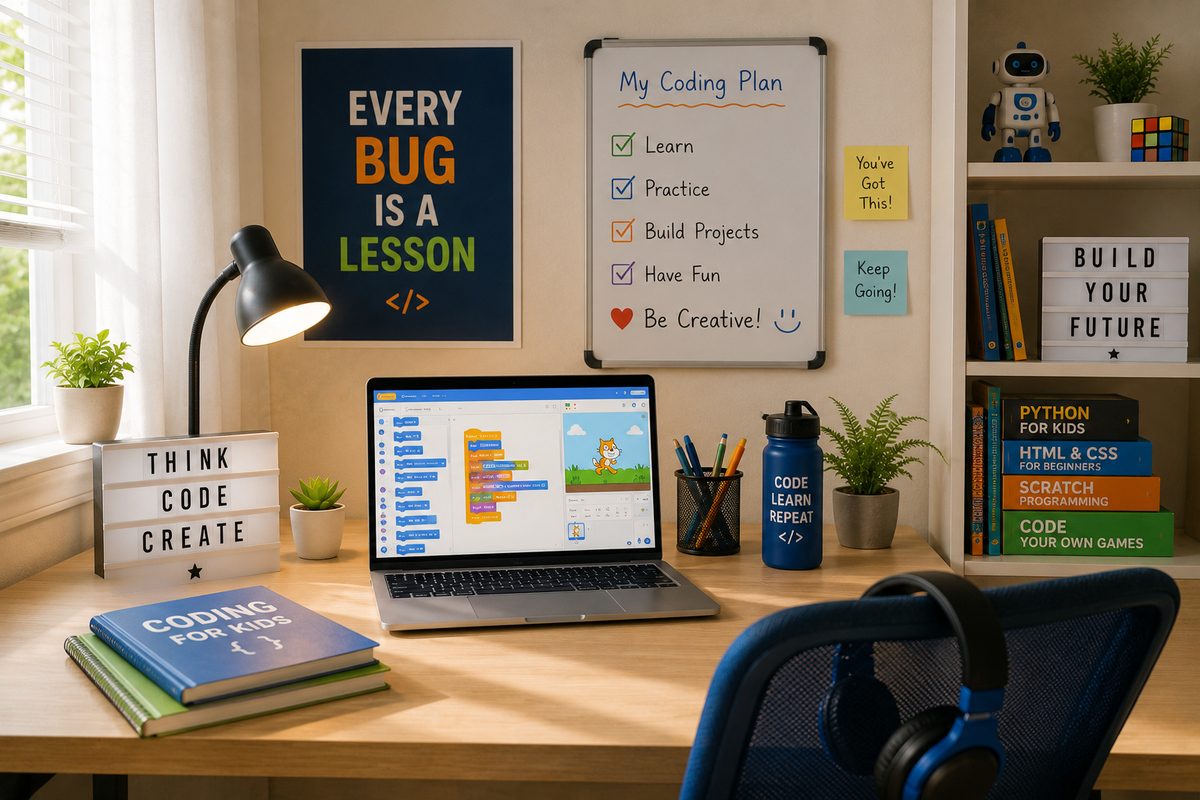
Parents sometimes imagine they need a dedicated computer laboratory.
Fortunately, that isn't necessary.
A supportive learning environment usually includes:
A quiet workspace.
A reliable laptop.
Internet access.
A notebook.
Regular practice time.
Encouragement.
Curiosity.
Patience.
More important than expensive equipment is consistency.
Thirty minutes of focused coding twice each week often produces better long-term progress than several hours once every few months.
Children learn best through repetition.
Choosing the Right Laptop
Many parents worry they need to buy a powerful gaming computer before their child can begin coding.
For beginners, this usually isn't necessary.
Most introductory coding activities work well on a standard laptop.
A suitable beginner computer should comfortably handle:
- Scratch
- Web browsers
- Video conferencing
- Python
- Basic web development
- Office software
Parents should instead focus on:
Reliable performance.
Good battery life.
Comfortable keyboard.
Stable internet connection.
The most expensive laptop rarely produces the best learning experience.
How Much Time Should Children Spend Coding?
Children do not need to code every day.
Consistency matters more than intensity.
A typical weekly routine might include:
A live lesson.
One independent practice session.
One creative project.
One revision activity.
This keeps learning enjoyable while leaving plenty of time for sports, reading, family activities and outdoor play.
The goal is sustainable curiosity—not burnout.
Should Coding Feel Like School?
Ideally, no.
Children already spend many hours completing schoolwork.
Coding at home should feel different.
Instead of:
"Complete page 17."
Children should hear:
"What would you like to build today?"
Learning becomes much more engaging when projects connect with personal interests.
For example:
A football fan could build a score tracker.
An animal lover could create a wildlife quiz.
A musician could design a rhythm game.
A young entrepreneur could create a simple website.
Programming becomes meaningful when children create something they care about.
How to Introduce Coding at Home
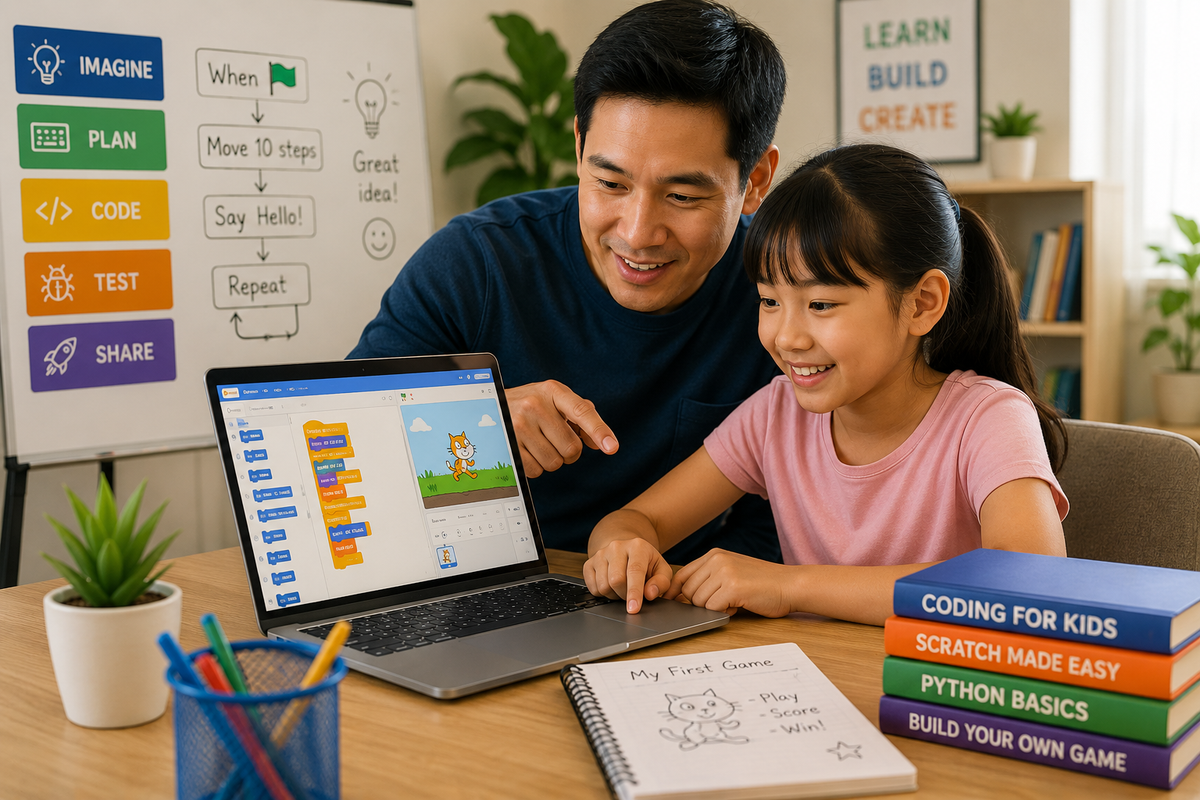
Many parents believe teaching coding means sitting their child down for long programming lessons.
In reality, children learn much more effectively through small, enjoyable experiences that gradually become more challenging.
Your goal is not to turn your living room into a classroom.
Your goal is to help your child become curious enough to ask,
"Can I build another one?"
Below is a simple progression that many families find manageable.
Week One: Explore and Play
The first week should focus on exploration rather than achievement.
Allow your child to become familiar with the coding environment.
For younger children using Scratch, this could involve:
- Moving a character around the screen
- Changing colours
- Playing sounds
- Making a character dance
- Switching backgrounds
Avoid correcting every mistake.
The objective is confidence.
If children enjoy the experience, they are much more likely to continue learning.
Week Two: Create Something Small
Now encourage your child to make something that works.
Examples include:
- A birthday card
- A simple maze game
- An interactive story
- A maths quiz
- A drawing programme
Projects should be achievable within one sitting.
Completing projects builds motivation.
Week Three: Encourage Problem Solving
Instead of giving answers immediately, ask questions.
For example:
"What do you think caused that?"
"What happens if you change this block?"
"What else could the character do?"
Children learn more from debugging than from watching adults solve every problem.
Week Four: Personal Projects
Now encourage your child to build something connected to their own interests.
Ideas include:
- Football score tracker
- Animal quiz
- Space adventure
- Treasure hunt
- Music game
- School timetable
- Weather app
- Virtual pet
Children are far more motivated when they choose the project themselves.
Choosing Your Child's First Programming Language
Parents often ask,
"Which language should my child learn first?"
The answer depends on the learner, not on which language is most popular.
Below is a practical comparison.
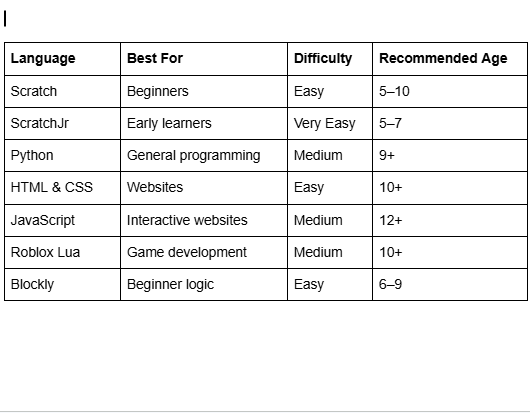
Each language teaches valuable concepts.
Parents should avoid choosing a language simply because someone on social media claims it is "the future."
The best first language is the one your child can enjoy.
Scratch vs Python
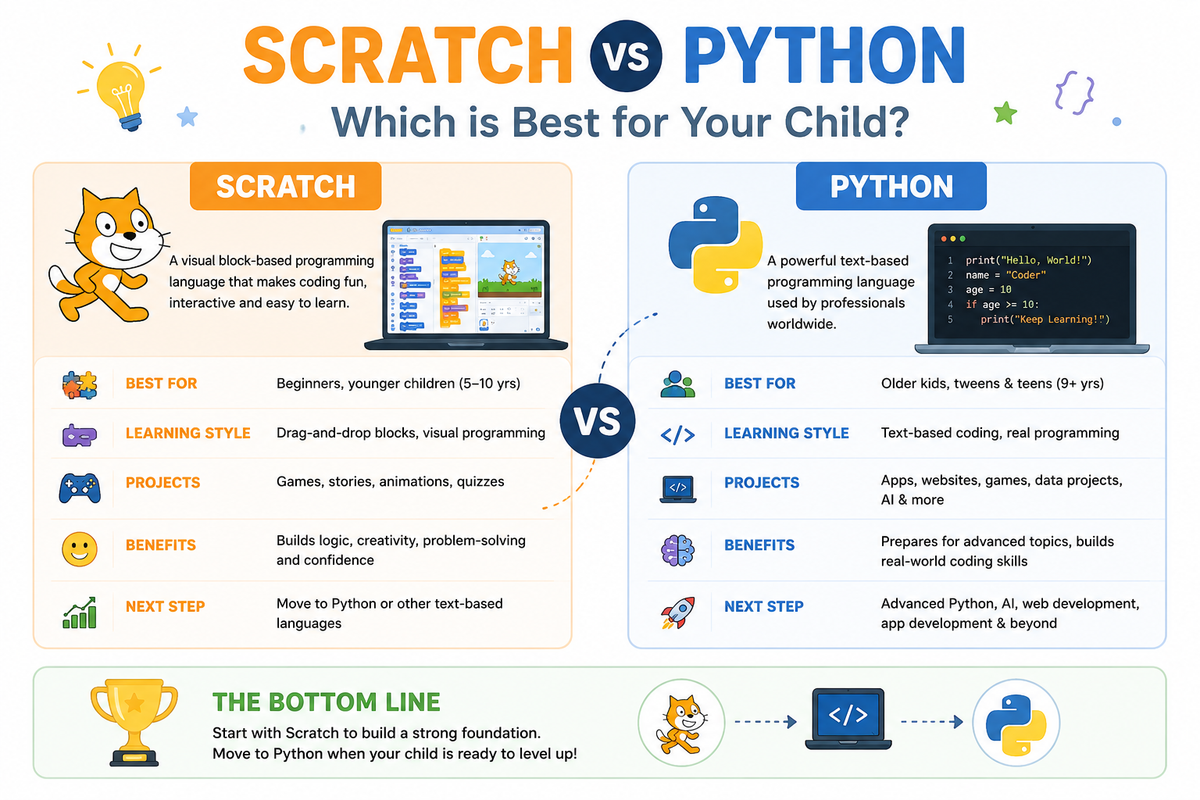
This is one of the most common questions parents ask.
Both are excellent.
They simply solve different problems.
Scratch
Advantages
- Visual
- Fun
- Colourful
- Beginner-friendly
- Immediate feedback
- Encourages creativity
Ideal for:
- Younger learners
- Complete beginners
- Children who enjoy games
- Children who enjoy storytelling
Python
Advantages
- Real programming language
- Widely used professionally
- Excellent for AI
- Excellent for data science
- Easy syntax compared with many languages
Ideal for:
- Older learners
- Children who understand coding basics
- Learners interested in AI
- Future software development
Parents should not view Scratch as "baby coding."
Scratch teaches many of the same logical concepts found in professional programming.
How Often Should Children Practise?
Consistency matters far more than marathon sessions.
A practical schedule might look like this.
Day Activity
Monday Live lesson
Wednesday Practise previous lesson
Friday Build a small project
Saturday Family coding challenge
Even one hour each week, when used consistently, can produce remarkable progress over time.
Children who enjoy coding often continue experimenting outside formal lessons.
Keeping Children Interested
Interest is one of the strongest predictors of long-term success.
Parents sometimes accidentally remove the fun from coding by making every session feel like homework.
Instead, keep learning playful.
Ways to maintain motivation include:
- Building games
- Creating stories
- Programming robots
- Friendly competitions
- Coding challenges
- Family demonstrations
- Digital badges
- Project showcases
Celebrate effort as much as results.
Let Children Choose Their Projects
Imagine two children.
One loves football.
The other enjoys baking.
Giving both children the same coding project makes little sense.
Instead:
The football fan could build:
- Match predictor
- League table
- Penalty shootout game
The baking enthusiast could create:
- Recipe organiser
- Cake decorating game
- Kitchen timer
Coding becomes much more meaningful when projects reflect personal interests.
Encourage Questions Instead of Giving Answers
One of the hardest habits for parents to break is solving problems immediately.
When children become stuck, resist the temptation to take over the keyboard.
Instead ask:
"What have you tried already?"
"What does the error say?"
"What do you think should happen?"
"What could you change?"
Children develop confidence by solving problems themselves.
Celebrate Small Wins
Parents often wait until a child completes a major project before offering praise.
Instead celebrate moments such as:
- Fixing a bug
- Remembering a loop
- Creating a new animation
- Explaining code
- Helping another learner
- Finishing today's lesson
Progress builds confidence.
Confidence builds consistency.
Consistency builds skill.
Mistakes Parents Should Avoid
Teaching coding becomes much easier when parents avoid common mistakes.
Starting Too Advanced
A seven-year-old rarely needs to begin with machine learning.
Start simple.
Complexity can come later.
Comparing Children
Every learner progresses differently.
Some children enjoy experimenting.
Others prefer careful planning.
Avoid comparisons with siblings or friends.
Focusing Only on Future Careers
Children should not feel they are preparing for a job every time they open a laptop.
Allow coding to remain creative.
Expecting Perfect Projects
Real programmers make mistakes every day.
Errors are normal.
Children should see debugging as part of learning.
Doing the Project Yourself
Parents naturally want to help.
Unfortunately, taking over the keyboard prevents learning.
Instead guide with questions.
Buying Expensive Equipment Too Soon
Many beginners need nothing more than:
- Laptop
- Internet
- Scratch
Parents sometimes spend large amounts on robotics kits before discovering whether the child actually enjoys coding.
Start small.
Expand gradually.
Free Coding Resources for Families
Parents often ask whether children can begin learning coding without paying immediately.
The answer is yes.
Several excellent beginner resources are available.
Scratch
Ideal for beginners.
Children create games and animations using colourful programming blocks.
Code.org
Offers structured introductory lessons for different age groups.
Excellent for computational thinking.
Blockly Games
Puzzle-based activities introducing programming concepts.
MIT App Inventor
Allows learners to build mobile applications visually.
Khan Academy
Provides introductory programming lessons alongside mathematics and computing topics.
YouTube
Can be useful for inspiration.
However, children often benefit more from structured lessons than from jumping between unrelated videos.
These resources work well for exploration.
Eventually, many families discover that children progress faster with live instruction, regular feedback and a structured curriculum.
When Should Your Child Join Live Coding Classes?
Parents often ask,
"Can my child learn everything at home?"
Some can.
Many eventually benefit from structured teaching.
Signs your child is ready include:
- Asking increasingly difficult questions
- Completing beginner projects easily
- Losing motivation with self-paced videos
- Wanting friends who also enjoy coding
- Asking for feedback
- Wanting to build larger projects
Live instruction provides:
- Accountability
- Expert guidance
- Collaboration
- Faster debugging
- Personal feedback
Many learners combine home practice with weekly live lessons.
This balance often produces the strongest long-term progress.
Creating a Healthy Coding Routine
Coding should become one part of a balanced lifestyle.
Children also need:
- Outdoor play
- Reading
- Physical activity
- Family conversations
- Creative hobbies
- Rest
Technology should support healthy development rather than replace it.
Parents should encourage regular breaks during longer coding sessions.
The aim is productive screen time—not endless screen time.
Helping Your Child Through Frustration
Every learner eventually encounters problems.
Perhaps the game stops working.
Perhaps the robot refuses to move.
Perhaps the website suddenly looks different.
These moments are valuable.
Instead of saying,
"Let me fix it."
Try saying,
"Let's investigate."
Professional programmers spend much of their careers solving problems.
Helping children stay calm during debugging teaches resilience.
Measuring Progress
Parents often ask,
"How do I know my child is improving?"
Instead of counting completed lessons, look for signs such as:
- Greater independence
- Better explanations
- Larger projects
- More confidence
- Improved debugging
- Creative thinking
- Willingness to experiment
- Better planning
The quality of thinking matters more than the number of certificates collected.
Building a Coding Portfolio
One of the best habits children can develop is saving their work.
Over time they can create a portfolio containing:
- Scratch games
- Python programs
- Websites
- Apps
- Robotics projects
- AI experiments
A portfolio allows children to see how much they have improved.
It also becomes useful when applying for competitions, schools or internships later.
Making Coding a Family Activity
Coding becomes even more enjoyable when parents participate.
Ideas include:
- Family game night using games your child built
- Robot challenges
- Website showcase evenings
- Coding treasure hunts
- Family project presentations
- "Teach Mum or Dad" sessions
Children often understand concepts more deeply after explaining them to someone else.
How Imagine STEM Academy Helps Parents Raise Future Creators
Many parents begin teaching coding at home with free tools, short activities and curiosity-driven projects.
This is an excellent way to introduce children to technology.
However, as children become more confident, they often begin asking bigger questions:
- "Can I build a real app?"
- "How do websites actually work?"
- "Can I make my own robot?"
- "Can I create a game like Roblox?"
- "How does artificial intelligence work?"
- "How do I make this project better?"
These questions usually signal that the child is ready for more structured guidance.
At Imagine STEM Academy (ISA), we believe every child learns differently. Rather than placing every learner into the same programme, we recommend pathways based on age, experience, interests and learning goals.
Our approach focuses on helping learners become creators, not just consumers of technology.
Students don't simply watch tutorials—they build projects, solve problems, collaborate with instructors and develop confidence through hands-on learning.
Recommended ISA Learning Path
The following pathway provides a natural progression from beginner to advanced learner.
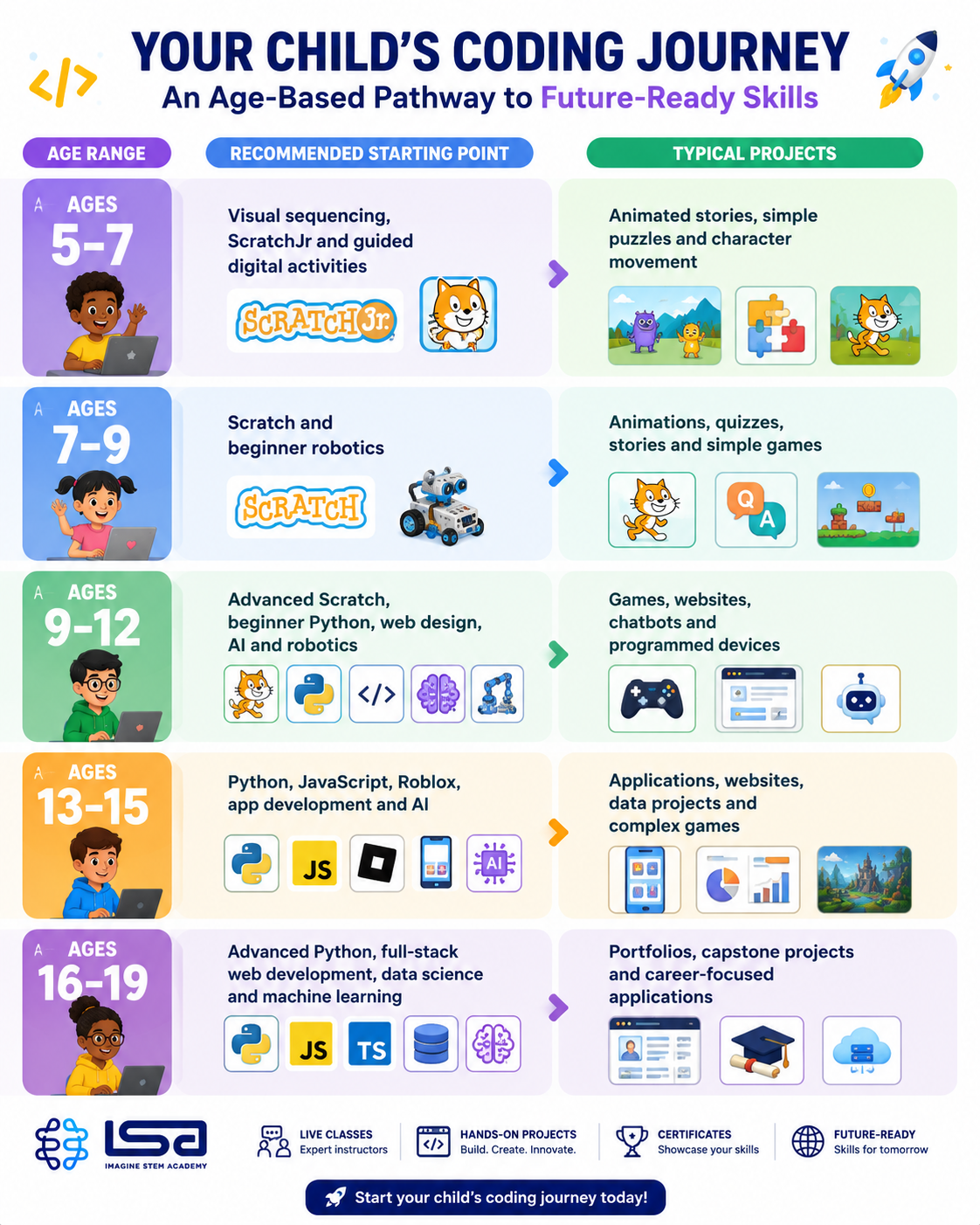
Every learner progresses at a different pace.
Some children may spend several months mastering Scratch before moving into Python, while others who already have coding experience may begin with more advanced topics.
The important thing is finding the right starting point rather than the most advanced course.
When Should Your Child Move Beyond Scratch?
Many parents worry that their child is "stuck" in Scratch.
In reality, Scratch teaches many of the same logical principles used in professional programming.
Rather than asking:
"How quickly can my child leave Scratch?"
Ask:
"Has my child mastered the thinking skills Scratch is designed to teach?"
A learner is often ready to progress when they can confidently:
- Create complete games independently
- Use variables correctly
- Understand loops
- Use conditional logic
- Debug their own projects
- Explain how their code works
- Build original projects rather than copying tutorials
Once these foundations are strong, moving into Python becomes much easier.
AI Is Changing How Children Learn Coding
Artificial Intelligence is becoming part of modern software development.
Many professional developers now use AI tools to:
- Generate ideas
- Explain code
- Find bugs
- Improve documentation
- Learn new programming concepts
Children should also learn how to use AI responsibly.
However, AI should never replace thinking.
Instead, children should first learn how to:
- Plan solutions
- Write simple code
- Test projects
- Find errors independently
Only then should AI become a learning assistant rather than a shortcut.
At ISA, AI is introduced as a creative tool that supports learning—not as a replacement for understanding.
Children are encouraged to ask:
- Why did the AI suggest this?
- Is the answer correct?
- Could there be a better solution?
- How can I improve it?
These questions help learners become thoughtful creators rather than passive users.
Coding Is About More Than Technology
One of the greatest misconceptions about coding is that it only prepares children for careers in software engineering.
In reality, programming develops habits that are useful across many fields.
Children who learn coding often practise:
- Creative thinking
- Logical reasoning
- Communication
- Persistence
- Teamwork
- Planning
- Research
- Decision-making
- Digital literacy
- Innovation
Whether a child eventually becomes an architect, doctor, entrepreneur, scientist, teacher or designer, these skills remain valuable.
A Long-Term Learning Journey
Coding is not a one-time course.
It is a journey.
A child might begin by making an animated cat move across a screen.
Months later, they could build a simple game.
Later still, they might create a website, programme a robot or develop an AI-powered application.
Every project builds confidence.
Every mistake teaches resilience.
Every completed challenge encourages curiosity.
Parents do not need to know where the journey will end.
They simply need to help children take the first step.
Ready to Help Your Child Start Coding?
Whether your child has never written a line of code or is already creating projects independently, the most important decision is simply to begin.
At Imagine STEM Academy, we help children aged 5–19 learn through:
- Live online and in-person classes
- Small group instruction
- Project-based learning
- Age-appropriate pathways
- Experienced STEM instructors
- Robotics, AI and coding programmes
- Personalised learning recommendations
- Practical projects that children are proud to present
Our goal is not simply to teach programming.
Our goal is to help children become confident problem-solvers who can use technology creatively and responsibly.
Book a Trial Class
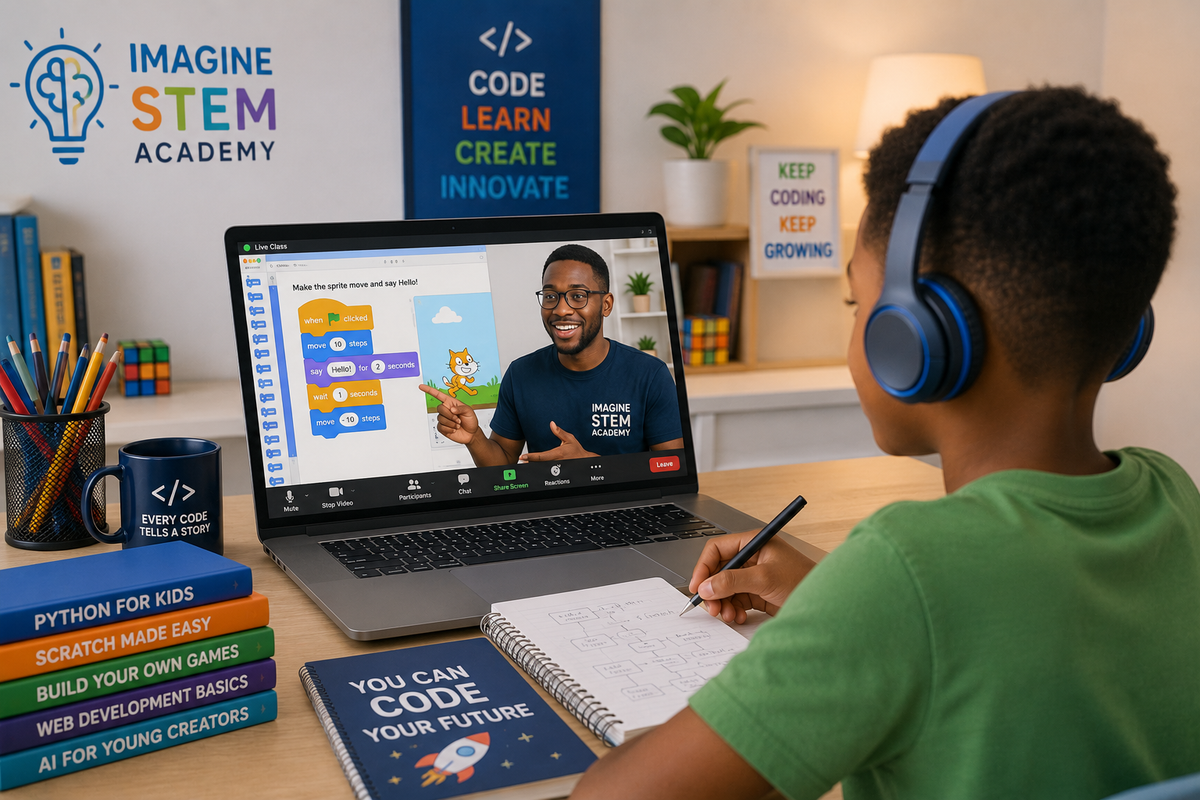
The best way to discover whether your child enjoys coding is to let them experience it.
During an ISA trial class, we'll:
- Assess your child's current experience
- Recommend the most suitable learning pathway
- Introduce age-appropriate projects
- Answer your questions as a parent
- Help your child build their first project
Frequently Asked Questions
Can I teach my child coding even if I don't know programming?
Yes. Parents do not need programming experience to encourage curiosity, provide learning opportunities and support their child's progress. Many families learn alongside their children.
What age should children start coding?
Many children begin learning coding between the ages of five and seven using visual programming tools such as ScratchJr or Scratch. The best age depends on the child's interest, reading ability and attention span.
Should my child start with Scratch or Python?
Most beginners benefit from starting with Scratch because it teaches programming concepts visually. Python is usually introduced after children understand the basics of logic and problem-solving.
Is coding difficult for children?
Coding can be challenging at times, but well-designed lessons break concepts into manageable steps. Children often enjoy coding when they build projects connected to their interests.
How often should children practise coding?
One or two structured sessions each week, combined with short periods of independent practice, are usually enough for steady progress.
Does coding improve maths?
Coding and mathematics share logical thinking skills, but children do not need to excel at mathematics before they begin learning programming.
Is coding suitable for girls?
Absolutely. Coding, robotics and artificial intelligence are valuable skills for all children, regardless of gender.
What laptop does my child need?
A reliable laptop with internet access is sufficient for most beginner coding courses. Expensive gaming computers are usually unnecessary.
Can my child learn coding from a tablet?
Some introductory activities work on tablets, but most programming courses require a laptop or desktop computer.
Should children learn AI before coding?
It is generally better to learn basic programming concepts first. Understanding coding makes AI easier to understand and use responsibly.
Can coding help with school subjects?
Coding supports logical thinking, creativity, communication and problem-solving, which may benefit learning in many subjects.
How do I know my child enjoys coding?
Look for signs such as curiosity, excitement about projects, willingness to solve problems and enthusiasm to continue building after lessons end.
How long does it take to learn coding?
Learning coding is an ongoing journey rather than a single course. Children often begin creating simple projects within weeks, while more advanced skills develop over months and years.
What should my child build first?
Simple projects such as animated stories, quizzes or games are ideal because they provide quick success while introducing core programming concepts.
Can siblings learn together?
Yes, although children with different ages or experience levels may benefit from different learning pathways.
Are coding games educational?
Many coding games introduce useful concepts, but they work best when combined with structured learning and project-based activities.
What happens if my child makes mistakes?
Mistakes are a normal part of programming. Debugging helps children develop resilience and problem-solving skills.
Does my child need internet access?
Most online classes require internet access. Some coding activities can be completed offline once the necessary software has been installed.
What is computational thinking?
Computational thinking is the process of breaking problems into smaller parts, identifying patterns and designing logical solutions. It forms the foundation of programming.
Why should children learn coding now?
Technology continues to shape education, business and everyday life. Learning coding helps children understand how digital tools work while developing creativity and critical thinking.
How do I choose the right coding course?
Consider your child's age, interests, previous experience and learning style. A placement assessment or trial lesson can help identify the most suitable starting point.